Showing posts with label MSCRM Titan Customization. Show all posts

09 April 2010

Stop previous workflow instance.

Recently come across a business scenario where a workflow needs to be run after record being assign to others. The problem is workflow configured as wait after 1 hour, then update a field.


It is possible that during the 1 hour waiting time, user might reassign again~~again, result of that is multiple same workflow actually is running and waiting at the same time...what we want is just the running the latest workflow instance only.


To solve this problem, create a CRM 4 plugin to query related workflow with specific workflow name, check its status then update it to cancelled.


Register as pre-stage; synchronous, so that it won't cancelled the latest workflow instance .


string error = string.Empty;

   ColumnSet colsWf = new ColumnSet(new string[] { "name", "statuscode", "asyncoperationid", "regardingobjectid" });

   ConditionExpression conditionName = new ConditionExpression("name", ConditionOperator.Equal, workflowName);
   ConditionExpression conditionRegardingObjectId = new ConditionExpression("regardingobjectid", ConditionOperator.Equal, recordId);

   FilterExpression filter = new FilterExpression();
   filter.FilterOperator = LogicalOperator.And;
   filter.AddCondition(conditionName);
   filter.AddCondition(conditionRegardingObjectId);

   QueryExpression query = new QueryExpression(EntityName.asyncoperation.ToString());
   query.Criteria = filter;
   query.ColumnSet = colsWf;

   BusinessEntityCollection results = service.RetrieveMultiple(query);
   if (results.BusinessEntities.Count > 0)
   {
    for (int i = 0; i < results.BusinessEntities.Count; i++)
    {
     asyncoperation singleWorkflowInstance = (asyncoperation)results.BusinessEntities[i];
     if (singleWorkflowInstance.statuscode.Value == AsyncOperationStatus.WaitingForResources || singleWorkflowInstance.statuscode.Value == AsyncOperationStatus.Waiting || singleWorkflowInstance.statuscode.Value == AsyncOperationStatus.InProgress || singleWorkflowInstance.statuscode.Value == AsyncOperationStatus.Pausing)
     {
      try
      {
       Status statusCanceled = new Status();
       statusCanceled.Value = AsyncOperationStatus.Canceled;

       AsyncOperationStateInfo state = new AsyncOperationStateInfo();
       state.Value = AsyncOperationState.Completed;

       SetStateWorkflowRequest request = new SetStateWorkflowRequest();
       singleWorkflowInstance.statuscode = statusCanceled;
       singleWorkflowInstance.statecode = state;

       TargetUpdateAsyncOperation operation = new TargetUpdateAsyncOperation();
       operation.AsyncOperation = singleWorkflowInstance;

       UpdateRequest update = new UpdateRequest();
       update.Target = operation;
       UpdateResponse updated = (UpdateResponse)service.Execute(update);
      }
      catch (System.Web.Services.Protocols.SoapException ex)
      {
       error = "KillWorkflow Error " + ex.Message + "" + ex.StackTrace;
      }
      catch (Exception ex)
      {
       error = "KillWorkflow Error " + ex.Message + "" + ex.StackTrace;
      }
     }
    }
    if (!string.IsNullOrEmpty(error))
    {
     throw new Exception(error);
    }
   }

08 August 2009

CRM 4: Right align number fields in CRM views

My friend ask is it possible to right align those CRM integer,float and money field to right, because user complaint it is hard to read it correctly in the CRM view, especially for money fields with different value. Well the answer is YES and the solution is very easy (after doing some Google+research, credit goes to Sam Jones)

Ideal is very straight foward, modify the CRM CSS file to make it right align for number field.
  1. From the _grid folder or search from wwwroot for "AppGrid.css.aspx"
  2. Find the class started with nobr.num
  3. Add an element in it: text-align : right;
  4. Refresh your CRM page.
FYI: CRM fields such as money,integer and float type all render as nobr.num, so change one place will do.

happy CRM'ing

30 June 2009

Maximum attributes supported by CRM 4!

During enterprise CRM implementation, we always deal with largr data volumn and massive configuration file. We might come to a point to ask: what is the CRM 4 attribute limit per entity?

If we study the CRM database scheme, noticed that custom attribute are store in separate table which is the extensionbase. So 1 attribute==1 column in the table. Limitation goes back to your SQL database. Different version/platform of the SQL can have different result.

To be confirm, always refer back to the Maximum Capacity Specifications for SQL server.In that microsoft paper, find the limit of column per base table, that is your limit. Eg: SQL 2005 & 2008 is 1024. Which means you can have 1024 attibute per entity creation.

I do some small testing, try to create the 1025 attibute and it prompt me "exceeds the maximum of 1024 columns". Try to reduce the attibutes if can, less columns means it run more faster!

08 April 2009

Latest CRM 4 SDK version 4.0.8

Microsft just release the latest CRM 4 sdk on this month.
Version 4.0.8

You can download it from here

19 February 2009

Timeout during heavy loaded tasks on CRM 4

I beleived most of us faced the problem where you can not change business unit of a user in CRM 4 or MSCRMSynchronous seems unabled to delete huge data. If you use CRM diagnostic tool to debug the request step by step, you will found it is cause by the timeout issue.

Default CRM4 application configure OLEDB timout as 30 seconds. We can modify the register in application server to extend the time. Refer the screen capture below:-

We just need to extend the OLEDBTimeout value and add a new DWORD key "ExtendedTimeout" . You can create the 2 keys if does not exist. By right OLEDBTimeout is already inserted during installation.


  1. Run >regedit
  2. expand the tree to >HKEY_LOCAL_MACHINE\SOFTWARE\Microsoft\MSCRM
  3. Change the default value 30 on OLEDBTimeout to the seconds you prefer. (Modify by Decimal)
  4. Next, right click MSCRM, NEW DWORD rename to "ExtendedTimeout". (Modify the Decimal value to 1000000)
  5. Important: in Decimal value do not type value larger than 2,147,483,647
  6. After you successful run those 'resources hungry' tasks, set back to original value. Delte those key that previously does not exist.
Below is the exception I get in the event logs before I extend the timeout value.
Happy CRM'ing :D

Event Source: MSCRMAsyncService
Event ID : 17415

Exception: System.Data.SqlClient.SqlException: Timeout expired. The timeout period elapsed prior to completion of the operation or the server is not responding.

Refer the Microsoft KB article also: http://support.microsoft.com/kb/918609

11 February 2009

Prompt Backdated Disallowed on CRM datetime field

CRM 4 date time control manage to minimize the error on user input by allow them to select a date from drop down calendar. Now, real word business scenario might required more advance of date time validation on date time field input.

Given scenario: Follow Up Date must be greater or equal to today.
The most easiest way to achieve the requirement is by Javascript; let see how it works
every time user change the field, onchange event on CRM fire the javascript to verify the input.

 <br />
function FollowUpDate() <br />
{ <br />
var current=new Date(crmForm.all.createdon.DataValue); <br />
var days=-1; //To handle crmForm onCreate or onChange <br />
if(crmForm.all.createdon.DataValue==null) <br />
{ <br />
d=new Date(); <br />
current.setFullYear(d.getYear(),d.getMonth(),d.getDate()); <br />
days=0; <br />
} <br />
<br />
var selected=new Date (crmForm.all.followupby.DataValue); <br />
<br />
var ONE_DAY=1000*60*60*24; <br />
var different=selected-current; <br />
var indicator=Math.round(different/ONE_DAY);  <br />
<br />
if(indicator<days){  
alert("Backdated disallowed for 'Follow Up By'."); 
crmForm.all.followupby.DataValue=null; 
}  
} 

Hope this simple javascript can help :)

23 January 2009

CRM 4: Modify default system view

Custom create view in CRM allowed us to delete and take control of all setting in the view; eg.: remove display colum, searching fields...

While CRM default view limited the customization of the view, you will see those view showing "You cannot delete this view". I will show some simple trick in order to Enable it back (You can delete system view then :D )

The CRM view setting actually store inside the database table [savedquerybaseset ]
Column [IsCustomizable]: * default is 0, just update it to 1.

Column [IsPrivate] to value 1 to hide.
update savedquerybaseset IsCustomizable=1
where name like 'test delete%'

If you having problem to remove column from view, refer to KB below:
Error message when you customize a view

Simple add about:blank to Trusted Sites.

05 January 2009

CRM4: Adding CRM style's button in template page


I added my custom link Bulk SMS Template to a custom aspx page.
First of all, browse to the CRMWeb, then Tools>>Templates>>map_xml.aspx
If you study the carefully, you will see the pattern. Just copy another set and then change to your custom page URL. You also can apply back the CRM default privilege setting on new added button.


<% if (Microsoft.Crm.Security.User.GetPrivilege(CurrentUser, Privileges.ReadContractTemplate)) { %>


Bulk SMS Template

/_imgs/Tools/smsIcon.gif

Create and manage custom template for SMS message.

/ISV/Search/Main.htm

<% } %>


*page id put others number that does not exist on existing page.
* Get privilege function means that it will visible to user who has the privilege!

13 December 2008

How to enable custom query string passing in CRM 4

Scenario: Auto fill in lookup fill on prospect create mode.

By default, MSCRM do not allow us to change the url of the CRM form,it will prompt CRM error page, for example the new prospect form. Url ended with this" /sfa/leads/edit.aspx"

How can I add custom parameter behind? " /sfa/leads/edit.aspx?user=Yang"
So that I can use javascript grab the parameter and perform additional tasks.

Solution:What
we need to do is change/add a DWORD registry key
named [DisableParameterFilter] under [HKEY_LOCAL_MACHINE\SOFTWARE\Microsoft\MSCRM],
set the value to 1.

Run iisreset, now you can append your custom parameters like normal ASP.NET web form.


03 December 2008

CRM Plugin: 32bits / 64 bits environment

Recently I found a post on CRM blog, most of the CRM developers develop plugin using 32 bits environment and then need to deploy to 64 bits production server. Latest SDK also included DLL for Microsoft.Crm.Sdk.dll and Microsoft.Crm.SdkTypeProxy.dll

  1. If you build using platform neutral, then it should works for both 32 & 64 bits environment CRM
  2. If you build using 32bits extension, then it should work on 32bits CRM only.
  3. If you build using 64bits extension, then it should work on 64bits CRM only.

Reference from ascentium CRM blog

26 September 2008

Maximum Upload File Size in CRM Titan

Previously in CRM 3, the maximum file size for attachment can be configure/found in the registry. In CRM Titan, Microsoft decided to store in Database because of Multitenancy Installation.

For some reason, I need to build a custom template page which can allow user to upload attachment, for the ease of configuration, i decided to share the attribute use by CRM to handle Max file size upload.


After some research, finally found that it is store under organizationbase table. It store as bytes data type. Remmember to multiply 1024 for actual bytes value.

select MaxUploadFileSize from organizationbase

18 September 2008

How to enable more than 8 Tabs in CRM form?

CRM default limit the tabs in form to 8 tabs only. We can easily [unlock]
 it by changing the CRM default ASPX page.

*Bear in mind that this is an unsupported customization, it might be replace by any Patch/RoleUp

browse to CRM installation directory, then go

Tools\FormEditor\formeditor.aspx  
and change the variable to the numbers of tabs you wish.
var _iMaxTabs = 8;

Here is the result I changed the limit to 10 tabs


13 September 2008

Using intellisense in ISV & sitemap XML

In order to reduce typing mistake in customizing CRM Titan's ISV and sitemap XML, we can configure it to use with intellisense in Visual Studio.

Download the latest CRM4 SDk, extract out. we need to make use of sdk\server\schemas
ISV:
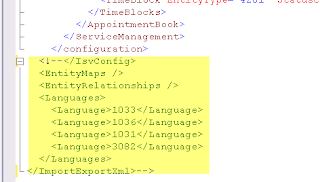
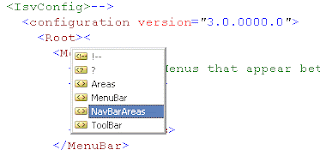
Open ISV.xml with VS2008, click browse under schema in properties window goto importexport. Add the file "isv.config.xsd" (for ISV) "customizations.xsd" (for Sitemap)
Use comment function in VS to comment out the tag highlighted (Remember uncomment it before import to CRM)


Now, intellisense is ready to use...


Sitemap:
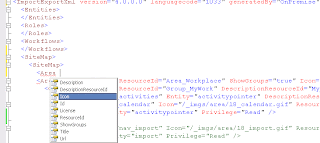
Configure for sitemap is more easy compare to ISV. (You don't need to comment the default tags)
After open the sitemap.xml in VS, make sure the 2 xsd is added as mentioned above.
Is ready to use now...

12 September 2008

Latest CRM4 SDK 4.0.6

Microsoft Dynamic CRM has released the latest SDK v 4.0.6. Some of the changes:
Get it from HERE

1) The Plug-in walk through in the SDK has been updated to match the readme that is included in the SDK\Walkthroughs folder.

2) The Readme file in the SDK\tools\deployworkflowtool folder has been corrected.

3) Additional sample code has been added in the Scripting Sample Code topic.

4) New content has been added to the URL Addressable Forms topic.

* Credit goes to Amy Langlois

24 August 2008

Show Scrollbar on MSCRM Titan for custom page

Fo those who wish to load custom page clicking the navigation panel. You will found that the custom page loaded in content panel wont show the scrollbar if you make explorer window smaller/page information overload.

Solution :
Use IFRAME to load your custom page. That means your navigation link is link to your IFRAME html page.

    <br />
<html style="height: 100%;"> <br />
<head> <br />
<title>Untitled Page</title> <br />
</head> <br />
<body style="width:100%; height:100%;" > <br />
<iframe id="frm" src="Search.aspx" frameborder="0" height="100%" width="100%"> <br />
</iframe> <br />
</body> <br />
</html> <br />
<br />

Create a html page using the code above. Then change the “src” to your custom page url.